

Cleaning rota template: free to print (A4) or edit in Excel
A cleaning rota template is a weekly table that shows who cleans which area each day, so everyone knows their job and no area is left out. It has a row per person, a column per day from Monday to Sunday and weekly hours. Free as an A4 PDF or Excel file, for workplaces, cleaning teams or shared houses.
Updated
Free download, no sign-up
Your template is downloading
If it does not start in a few seconds, tap the button again.
Next step, no paper: put a QR code on each zone. Cleaners scan it with their phone and your dashboard shows which zones were cleaned, and when.
Get your free accountFree for up to 5 zones.
Prefer chat? We’ll set up your account on WhatsApp or TelegramCleaning rota. A4 landscape. Editable Excel and Word files to add your own zones.
Rather go paperless? Put a QR code on each zone and the phone sets the time at the scan. Try it free
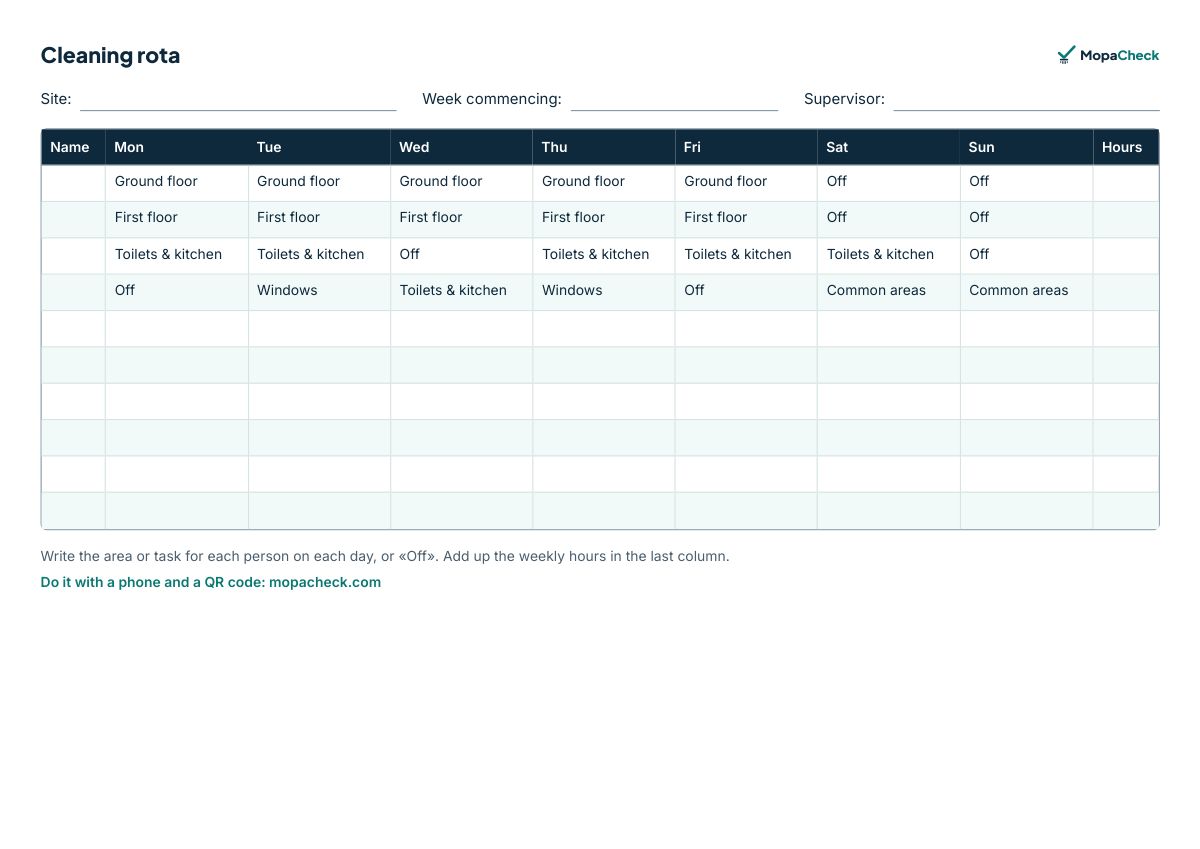
What the log looks like: cleaning rota
Cleaning rota

| Name | Mon | Tue | Wed | Thu | Fri | Sat | Sun | Hours |
|---|---|---|---|---|---|---|---|---|
| Ground floor | Ground floor | Ground floor | Ground floor | Ground floor | Off | Off | ||
| First floor | First floor | First floor | First floor | First floor | Off | Off | ||
| Toilets & kitchen | Toilets & kitchen | Off | Toilets & kitchen | Toilets & kitchen | Toilets & kitchen | Off | ||
| Off | Windows | Toilets & kitchen | Windows | Off | Common areas | Common areas | ||
How do you set up a cleaning rota?
A rota answers one question: who cleans what, and when. Put one person per row and, for each day, write the area they cover or ‘Off’. Rotate the jobs nobody wants, such as the toilets, and check that every area has someone on every day it needs cleaning.
In Great Britain, regulation 9 of the Workplace (Health, Safety and Welfare) Regulations 1992 requires every workplace, and its furniture, furnishings and fittings, to be kept sufficiently clean. It does not say how often: a rota makes clear who keeps each area clean and when.
How often each area needs doing depends on how busy it is. As a rough guide:
| Area | Workplace | Shared house |
|---|---|---|
| Toilets | Daily, more often if busy | Weekly, with a quick wipe in between |
| Kitchen | Daily | Wipe surfaces daily, full clean weekly |
| Bins | Daily | When full and on collection day |
| Floors | Daily in busy areas, weekly elsewhere | Weekly |
| Desks and common areas | Daily | Weekly |
| Windows and glass | Entrance weekly, inside monthly | Monthly |
How do you fill in a cleaning rota?
- Write the site, the week commencing date and the supervisor at the top.
- List your cleaners in the Name column, one per row.
- For each day, write the area or task each person covers, or ‘Off’.
- Check that every area is covered on every day it needs cleaning, weekends included.
- Add up each person’s hours for the week in the last column.
- Put the rota up where the team can see it and keep a copy on file each week.
What are the most common cleaning rota mistakes?
- Giving the same person the toilets every week.
- Leaving an area uncovered when someone is off or on holiday.
- Writing ‘general clean’ instead of a specific area.
- Treating the rota as proof: it shows who should clean, not who did.
Sources
From a rota to proof the cleaning was done
A rota says who should clean each area; MopaCheck shows who did. Put a QR code or NFC tag in each area. The cleaner scans it with their mobile when finished and the real time is recorded. If an area is missed, the supervisor gets an alert, and each month your client receives a report with your cleaning company’s branding.
Get your free accountFree for up to 5 zones.
Prefer chat? We’ll set up your account on WhatsApp or TelegramMore free templates
Frequently asked questions
What is the difference between a cleaning rota and a cleaning schedule?
A cleaning schedule lists what needs cleaning and how often. A rota shares those jobs out between people, day by day. Most teams need both: the schedule sets the work and the rota assigns it.
How do I make a cleaning rota fair?
Rotate the jobs nobody wants, such as toilets and bins, every week. Balance the hours in the last column and agree the rota with the team before you put it up.
Can I use it for a shared house or a family?
Yes. Write your housemates or family members in the Name column and the rooms or chores for each day. Leave the Hours column blank if you don’t need it.
Is the template free?
Yes, free with no sign-up, in PDF and Excel (A4). You can edit it and use it with your team or your clients.